

Your Letterhead, Every Time
Every calc sheet the Structural Agent produces carries a full project header, and you control every field in it: project name, project number, project task, calc by, calc date, checked by, checked date, and the project address, plus your company logo pulled from your Standards folder. Set the fields and the logo once, and every Mathcad sheet, Excel workbook, and PDF report comes out on your firm’s letterhead. Here is the header on a finished calc sheet:
The Header Fields
Calc by and checked by are your QA trail. Fill them the way your firm’s review process expects: you are the engineer of record, and the header carries that on every page.
One-Time Setup
1
Put your logo and templates in the Standards folder
Open Files from the account menu and find the Standards folder, marked with the book icon. Upload your logo (a PNG with a transparent background works best) along with anything else that defines your format: a report template, a sample calc package, formatting notes.
2
Confirm Formatting standards is on
Click the + button in the message box. Formatting standards shows a toggle, on by default. With it on, the agent reads your Standards folder before it formats anything: no tagging needed in each prompt.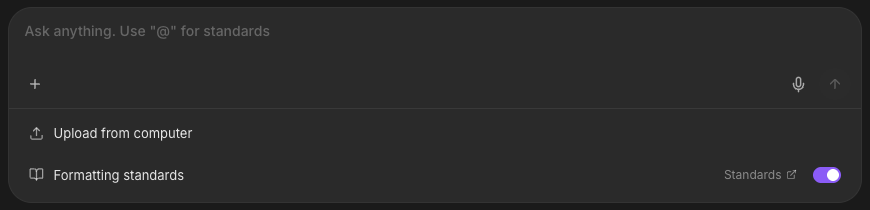
3
Save your header defaults as a standard
Tell the agent the fields once and keep them:The header block lands in your Standards folder, and future conversations pick it up automatically. The task and the dates change with every calc, so leave those to each request.
Example: header defaults
Generate the Deliverable
Ask for the calc or report the way you normally would: the header and formatting come from your standards. Set the task per calc, and override any field inline when a sheet needs something different:Example: calc package
Example: field report
One-Off Formats
For a client format you will use once, skip the Standards folder: attach the template with the + button and reference it in the prompt.Example
Next Steps
Your Standards Folder
Where the logo and templates live, and how the agent uses themStandards Folder guide
Mathcad Calc Sheets
The calc package that wears this headerMathcad Calc Sheets guide
Excel Spreadsheets
Workbooks with the same header rows built inExcel Spreadsheets guide
Design Checks
The brief that fills the sheet under the headerDesign Checks guide
Questions? Email support@stru.ai or book a call.