

Files & Standards
Your Standards Folder
Put your company's templates and formatting guides in one folder, switch it on in a chat, and every deliverable comes out your way
Deliverables in Your Company’s Format
Put your templates and formatting instructions in a standards folder. Enable it from the + menu in a conversation so the agent can use those files when preparing your documents.
What engineers put in it:
- RFI / RFA templates: so a generated RFI follows your form (see Generate RFIs & RFAs)
- Report boilerplate, cover sheets, and your logo: calc packages come out looking issued, not generic
- Formatting guides and checklists: units conventions, numbering, QA sign-off blocks
- Representative calculation examples: “make it look like this one”
A standards folder is marked with a book icon in your file list:
Your standards folder vs. design standards. A standards folder holds your own reference documents. The Standards section you see when you type @ in the chat is different: that is the built-in design-code library (ACI, ASCE, AISC, and regional codes) provided by Stru. This guide is about your folder; the code library is covered in Mentions & Attachments.
Two Kinds of Standards Folder
My standards
Your own pointer. Any folder you can edit can be your standards folder. It follows you into every conversation.
Organization standards
One folder the whole organization shares. Offered in conversations that work in an organization project.
The two are independent. Set one, both, or neither, and switch each on per conversation.
Set My standards
Open Files
Open Files from the account menu in the top-right corner.
Right-click the folder
Right-click the folder’s row (on a trackpad: two-finger click, or Control-click) and choose Set as my standards folder. The folder gets the book icon.
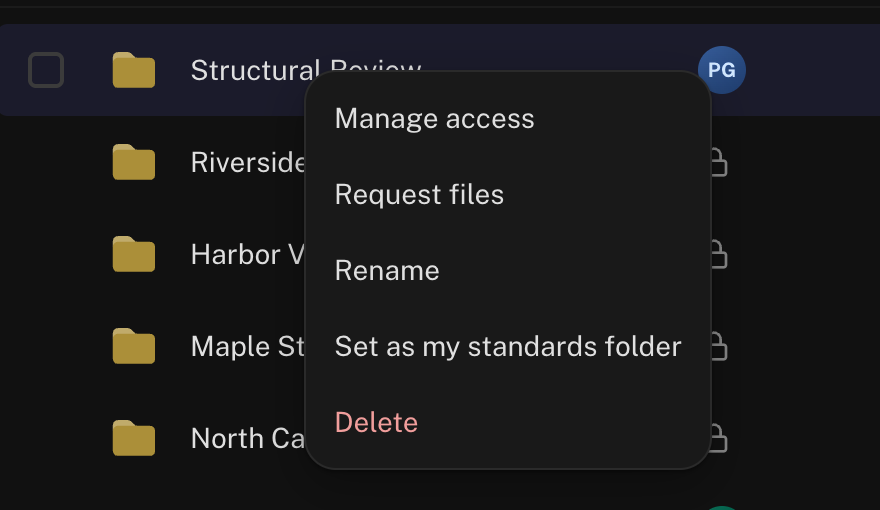
To point at a different folder, set the new one; to clear it, right-click the current one and choose Remove my standards folder. The pointer is personal: it changes only which folder your conversations use.
Set Organization standards
Inside an organization project, the same right-click menu offers Set as organization standards folder. Your organization’s owners decide who may change it: anyone with access to the folder, or owners and admins only. Everyone in the organization then gets the Organization standards toggle in chats that work in an organization project.
Use It in a Chat
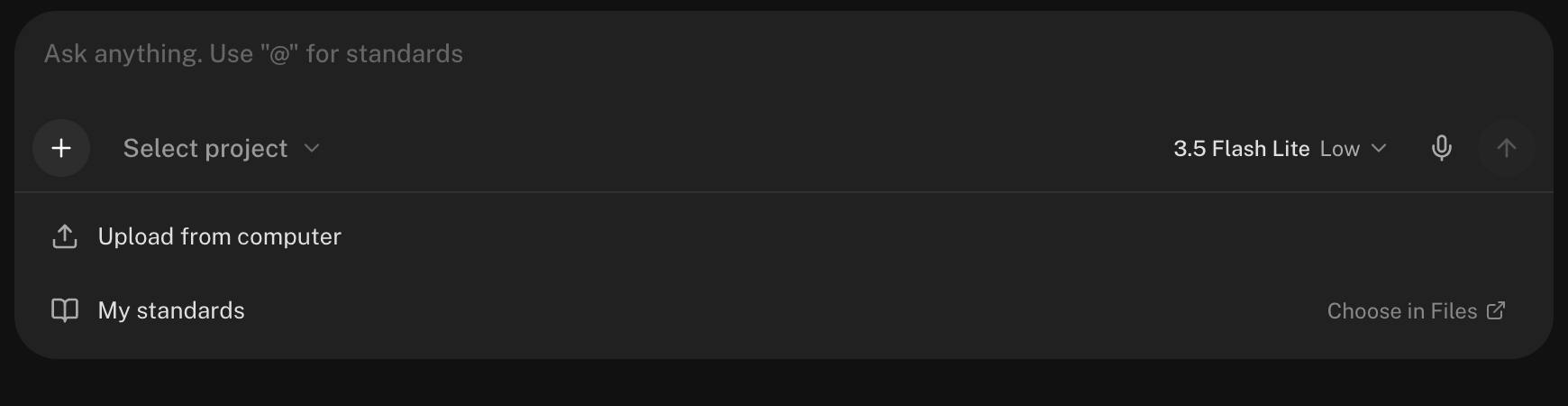
Open the + menu
Click the + button in the message box. My standards and Organization standards each have an on/off toggle, and the folder name beside the toggle opens it in Files.
Switch it on
The toggles start off in every new conversation. Switch on the one you want; it stays on for that conversation.
Ask for your deliverable
Chat normally: ask the Structural Agent for a report, an RFI, a calc sheet. The agent reads your standards as reference and follows the formats it finds there. It reads only what the task needs.
Using the same template every time? Put it in your standards folder once instead of tagging it in every prompt. For a worked example with an RFI template, see Generate RFIs & RFAs.
Reviews use your standards too: when you set up a Drawing Review, your standards folders appear in the file tree, and ticking them gives the reviewer your firm’s references at no charge.
Keeping It Healthy
Short and current beats large and stale. A handful of well-chosen templates (report format, RFI form, calc example, logo) outperforms a dump of every document your firm has ever produced. The agent follows what it finds.
No. Standards are read-only reference for the agent: it reads them and never writes, renames, or deletes anything there. Deliverables go to the conversation’s folder or selected project as usual (see File Management).
Replace or edit the file in Files. The next message in any conversation with that standards toggle on reads the new version. Keep write access tight on an organization folder with Sharing & Permissions.
The toggle stops offering it and chats carry on without it. Deleted folders sit in Trash for 30 days; restore it and your designation picks up again, as it does when access comes back.
No: a standards folder is reference, not a workspace, so it doesn’t appear in the Select project menu. Keep job files in a project folder and switch your standards on beside it.
Next Steps
Branded Reports
Your header fields and logo on every calc sheet and report.
Generate RFIs & RFAs
Use a company template from your standards folder.
File Management
Folders, Trash, and where files land.
Using the Chat Input
The + menu and the rest of the message box.
Email support@stru.ai for help.