

Pick the Review That Matches the Job
When you launch a Drawing Review, you choose a review mode, the kind of check the reviewer runs on your set, and optionally refine it with additional instructions. Different points in a project call for different reviews: a code check before issue is not the same job as a constructability pass before bid.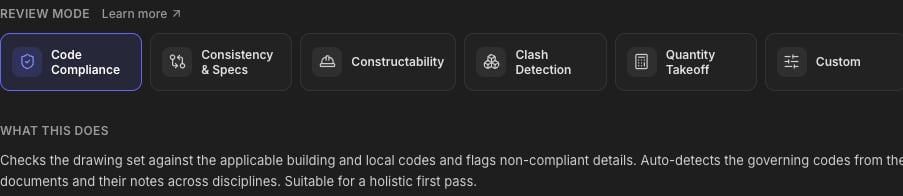
The Six Modes, by the Job They Do
Code Compliance
The pre-issue check. Flags details, notes, and schedules with potential issues against the governing building codes, across disciplines. It surfaces the flags; the compliance call stays with you, the engineer. The default, and the right first pass on most sets.
Consistency & Specs
The after-revisions check. Cross-references sheets, details, sections, and callouts against each other and the specifications, catching conflicts, mismatched tags, and references that point nowhere. Run it after a heavy revision cycle.
Constructability
Catch the things that become RFIs later. Reads the set the way the field will, flagging missing dimensions, underspecified details, and conflicting information that would otherwise come back as RFIs during construction. Run it before the set goes out to bid.
Clash Detection
The coordination check on the sheets. Flags cross-discipline conflicts visible across the drawing set: structure vs. MEP layouts, embeds vs. rebar congestion, equipment vs. stated clearances. It reads the drawings, not a 3D model. For model-based geometric clash detection, use the BIM Agent with your IFC model.
Quantity Takeoff
The estimating job. Produces quantity schedules from the drawings. Tell it what to quantify and in what units. This mode requires instructions.
Custom
Your scope, your rules. You define what to check, what to ignore, and what the output should look like. Requires instructions.
Modes seed the instructions. Picking a mode pre-fills the review’s instructions with that mode’s scope. The What this does text under the cards tells you exactly what you’re getting. You can run it as-is, or edit the instructions to narrow or extend it.
Writing Additional Instructions
The Additional Instructions field is how you brief the reviewer. It’s optional for most modes and required for Quantity Takeoff and Custom. The badge next to the field tells you which.
- The governing code and edition: “Check against IBC 2024 and ACI 318-19” beats letting the reviewer infer it.
- Where to focus: discipline, sheet range, or system: “structural sheets only,” “focus on the podium transfer level.”
- What a useful finding looks like: “flag anything that would require an RFI,” “list every detail referencing a spec section that doesn’t exist.”
- The output you want (Takeoff/Custom): “a quantity schedule of all structural steel by member size, in tons.”
Example briefs, mode by mode
- Code Compliance
- Consistency & Specs
- Constructability
- Quantity Takeoff
FAQs
Which mode should I start with?
Which mode should I start with?
Code Compliance for a design review before issue; Constructability before the set goes to bid; Consistency & Specs after a heavy revision cycle.
Can I combine modes?
Can I combine modes?
Pick the closest mode and extend it in the instructions, e.g. Code Compliance plus “also flag any callout inconsistencies you notice along the way.” For a fully mixed scope, use Custom and describe everything.
Does the mode change the price?
Does the mode change the price?
No. Pricing is per drawing page in scope, regardless of mode or instructions. See Review Pricing.
What does the review actually read?
What does the review actually read?
Everything in the folder with its Include checkbox on: drawings are reviewed page by page, and supporting documents (specs, reports, calcs) are reference context. Labels and scope are covered in the Drawing Review guide.
Next Steps
Drawing Review
The full launch-to-results walkthroughDrawing Review guide
Review Pricing
Per-page pricing and page creditsReview Pricing guide
Questions? Email support@stru.ai or book a call.