

Know the Cost Before You Commit
Drawing Reviews are priced by one simple rule: you pay per drawing page in scope. Supporting documents (specs, reports, calculations, images) ride along free as reference material. You always see the full price before a review starts, and nothing runs until you confirm it.$3 USD per page
Each drawing page in the review’s scope
1 credit = 1 page
A review page credit covers one drawing page
Reference is free
Specs and supporting documents aren’t billed
Separate from your plan credits. Drawing Review is billed with its own review page credits. It never draws from the monthly usage credits that power your conversations. Check balances any time in your Usage and Credits pages.
The Quote: What You See Before Starting
The review dialog shows exactly what the run costs before you start it: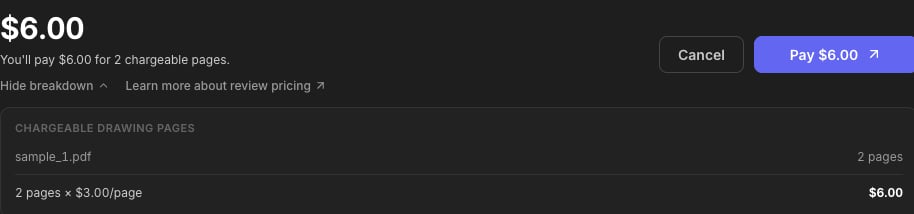
- Pages in scope: the page count across the files labeled Drawing with their Include checkbox on (see the Drawing Review guide).
- Credits applied: page credits from your balance are used first, automatically.
- Amount due: if credits don’t cover the full scope, the remainder is payable by card: the start button becomes Pay, and the review begins once payment confirms.
Review Page Credits
Page credits are the prepaid currency for reviews:- 1 credit covers 1 drawing page, whatever the review mode.
- They never expire.
- They’re applied automatically to every quote before any card payment is requested.
For Organizations
Organizations share a review page credit pool, managed by admins from Organization → Credits:
- Buy page credits: top up the pool at any time.
- Per-member allocation: control how much of the shared pool each member can draw. A member who exceeds their allocation can still run reviews by paying by card.
- Reviews launched by members draw from the pool first, then their own balance.
Where do I see my credit balance?
Where do I see my credit balance?
Organization admins see the pool and per-member usage under Organization → Credits. For everyone, the review dialog’s quote shows exactly how many credits will be applied to the run you’re about to start.
Does a bigger review mode cost more?
Does a bigger review mode cost more?
No. Pricing is pages × rate regardless of the mode or instructions. See Review Modes.
How do I keep the cost down on a big set?
How do I keep the cost down on a big set?
Scope it: flip the Include checkbox off for superseded sheets, and split a massive set into per-package folders so each review covers only what you need checked.
What if my payment goes through but I change my mind?
What if my payment goes through but I change my mind?
Email support@stru.ai with the review name and the folder it was launched from, and the team will make it right.
Next Steps
Drawing Review
Launch your first reviewDrawing Review guide
Review Modes
Pick the review that matches the jobReview Modes & Instructions
Questions? Email support@stru.ai or book a call.