> ## Documentation Index
> Fetch the complete documentation index at: https://docs.stru.ai/llms.txt
> Use this file to discover all available pages before exploring further.
# Mathcad Calc Sheets
> Ask for a calc and download a formatted, unit aware Mathcad sheet, built live in the Canvas with a PDF report alongside
## From Prompt to .mcdx
Ask the [Structural Agent](/platform-guides/structural-agent) for a calc as a Mathcad sheet and the finished file comes back as a **.mcdx** download with a PDF report alongside: header, assumptions, code references, the calculations, and the final design check, laid out to be reviewed line by line.
The whole workflow fits in one exchange:
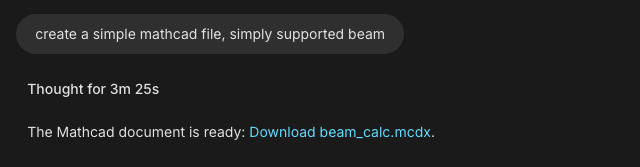 Calc packages engineers pull this way: wind pressure packages, retaining wall design calcs, post tensioned beam checks, weld and connection checks, and the firm's old Excel sheets rebuilt as Mathcad.
***
## Step-by-Step
Give the brief in one message (geometry, loads, materials, code, units) and end with "deliver as a Mathcad calc sheet". [Design Checks](/workflows/design-checks) covers the brief in depth; here is one for a full package:
```text Example: wind pressure package theme={null}
Create a wind pressure calc package for a 45 ft tall office
building at 1600 4th Ave, Seattle, WA 98101. ASCE 7-22, Risk
Category II, Exposure C. MWFRS pressures for both directions
and components and cladding zones. US units.
Deliver as a Mathcad calc sheet.
```
Need the site parameters first? See [Wind & Seismic Loads](/workflows/wind-seismic-loads).
The sheet takes shape in the [Canvas](/how-to/canvas) beside the chat: header first, then assumptions, code references, calculations, and the design check.
Calc packages engineers pull this way: wind pressure packages, retaining wall design calcs, post tensioned beam checks, weld and connection checks, and the firm's old Excel sheets rebuilt as Mathcad.
***
## Step-by-Step
Give the brief in one message (geometry, loads, materials, code, units) and end with "deliver as a Mathcad calc sheet". [Design Checks](/workflows/design-checks) covers the brief in depth; here is one for a full package:
```text Example: wind pressure package theme={null}
Create a wind pressure calc package for a 45 ft tall office
building at 1600 4th Ave, Seattle, WA 98101. ASCE 7-22, Risk
Category II, Exposure C. MWFRS pressures for both directions
and components and cladding zones. US units.
Deliver as a Mathcad calc sheet.
```
Need the site parameters first? See [Wind & Seismic Loads](/workflows/wind-seismic-loads).
The sheet takes shape in the [Canvas](/how-to/canvas) beside the chat: header first, then assumptions, code references, calculations, and the design check.
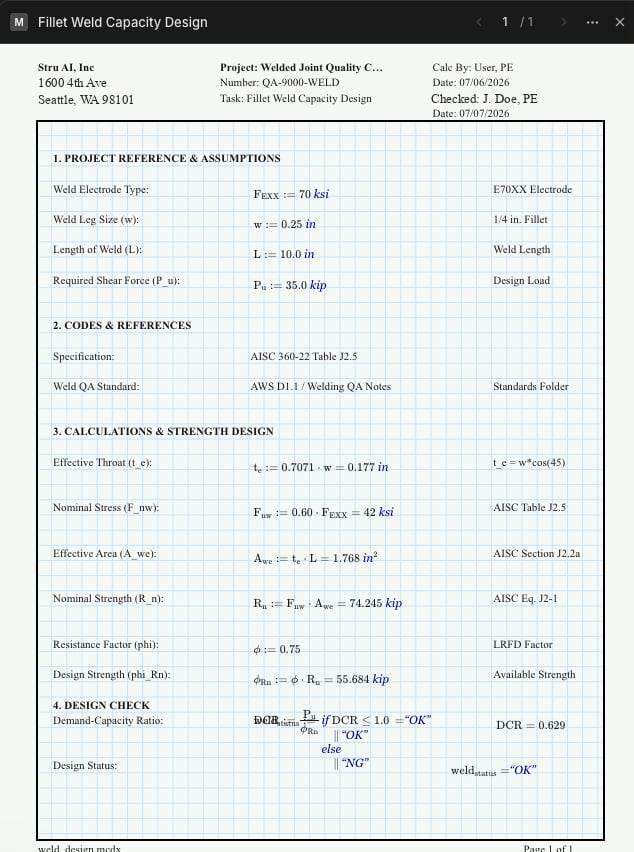 Click anywhere on the sheet to place a cursor. The agent sees where you are pointing, so "add the parapet case here" needs no further explanation.
Follow-ups edit the same sheet: "tighten the deflection check", "add the roof uplift case", "switch the exposure to D and update everything downstream". Keep each request to one change and the sheet stays clean.
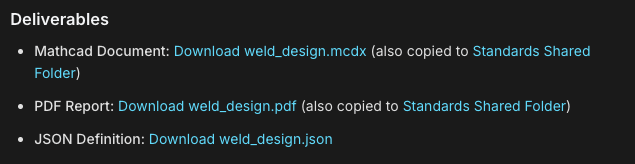
The finished files arrive as download links in the chat: the .mcdx, a PDF report, and the supporting files, all saved to your [Files area](/how-to/file-management) automatically.
Click anywhere on the sheet to place a cursor. The agent sees where you are pointing, so "add the parapet case here" needs no further explanation.
Follow-ups edit the same sheet: "tighten the deflection check", "add the roof uplift case", "switch the exposure to D and update everything downstream". Keep each request to one change and the sheet stays clean.
The finished files arrive as download links in the chat: the .mcdx, a PDF report, and the supporting files, all saved to your [Files area](/how-to/file-management) automatically.
 ***
## Rebuild an Excel Sheet as Mathcad
Firms keep years of design spreadsheets. Tag one and have it rebuilt as a calc sheet with the math written out:
```text Example theme={null}
@Base_Plate_Design.xlsx Rebuild this spreadsheet as a Mathcad calc
sheet: same inputs, same checks, every formula written out with
its code reference so it can be reviewed line by line.
```
The agent reads the workbook, traces the formulas, and lays the calc out as a sheet a checker can follow without opening Excel. Tagging is covered in [Mentions & Attachments](/how-to/mentions); the reverse direction (a calc as a living workbook) is [Excel Spreadsheets](/workflows/excel-spreadsheets).
***
## Read It Back Before You Sign
The last step of a strong session is a walkthrough. Ask the agent to read the finished sheet back:
```text Example theme={null}
Open the finished calc and walk me through the governing check:
the demand, the capacity, the clause it comes from, and the margin.
```
You are the engineer of record, and the walkthrough is how you put your confidence behind the numbers before the package goes out.
***
## On Your Firm's Letterhead
Every sheet carries a project header you control: project name, number, task, calc by, checked by, dates, address, and your company logo from the [Standards folder](/how-to/standards-folder). Set the fields once and the .mcdx and the PDF both come out looking issued. The setup is [Branded Reports](/workflows/branded-reports).
***
## Next Steps
How to write the brief that gets a complete calc
[Design Checks guide](/workflows/design-checks)
Header fields and your firm's logo on every sheet
[Branded Reports guide](/workflows/branded-reports)
The same calcs as workbooks with live formulas
[Excel Spreadsheets guide](/workflows/excel-spreadsheets)
The workspace where the sheet takes shape
[Canvas guide](/how-to/canvas)
**Questions?** Email **[support@stru.ai](mailto:support@stru.ai)** or [book a call](https://cal.com/bhosh).
***
## Rebuild an Excel Sheet as Mathcad
Firms keep years of design spreadsheets. Tag one and have it rebuilt as a calc sheet with the math written out:
```text Example theme={null}
@Base_Plate_Design.xlsx Rebuild this spreadsheet as a Mathcad calc
sheet: same inputs, same checks, every formula written out with
its code reference so it can be reviewed line by line.
```
The agent reads the workbook, traces the formulas, and lays the calc out as a sheet a checker can follow without opening Excel. Tagging is covered in [Mentions & Attachments](/how-to/mentions); the reverse direction (a calc as a living workbook) is [Excel Spreadsheets](/workflows/excel-spreadsheets).
***
## Read It Back Before You Sign
The last step of a strong session is a walkthrough. Ask the agent to read the finished sheet back:
```text Example theme={null}
Open the finished calc and walk me through the governing check:
the demand, the capacity, the clause it comes from, and the margin.
```
You are the engineer of record, and the walkthrough is how you put your confidence behind the numbers before the package goes out.
***
## On Your Firm's Letterhead
Every sheet carries a project header you control: project name, number, task, calc by, checked by, dates, address, and your company logo from the [Standards folder](/how-to/standards-folder). Set the fields once and the .mcdx and the PDF both come out looking issued. The setup is [Branded Reports](/workflows/branded-reports).
***
## Next Steps
How to write the brief that gets a complete calc
[Design Checks guide](/workflows/design-checks)
Header fields and your firm's logo on every sheet
[Branded Reports guide](/workflows/branded-reports)
The same calcs as workbooks with live formulas
[Excel Spreadsheets guide](/workflows/excel-spreadsheets)
The workspace where the sheet takes shape
[Canvas guide](/how-to/canvas)
**Questions?** Email **[support@stru.ai](mailto:support@stru.ai)** or [book a call](https://cal.com/bhosh).